Deep Dive Into Geek Bar Starry UI Display Technology: The Engineering Behind Modern Vape Interfaces
For years, electronic vapor hardware existed in a diagnostic blackout. Early disposables operated as silent black boxes: you drew vapor until a tiny LED light on the bottom flickered red, signaling that either your battery cell was exhausted or your wicking cotton was about to burn. Deep Dive Into Geek Bar Starry UI Display
Then came the first wave of smart screens—small, flat rectangular LCD windows glued to front panels that offered basic two-digit numbers for battery charge and a static drop icon for oil levels. While helpful, these early displays felt like an afterthought attached to standard plastic shells. Deep Dive Into Geek Bar Starry UI Display
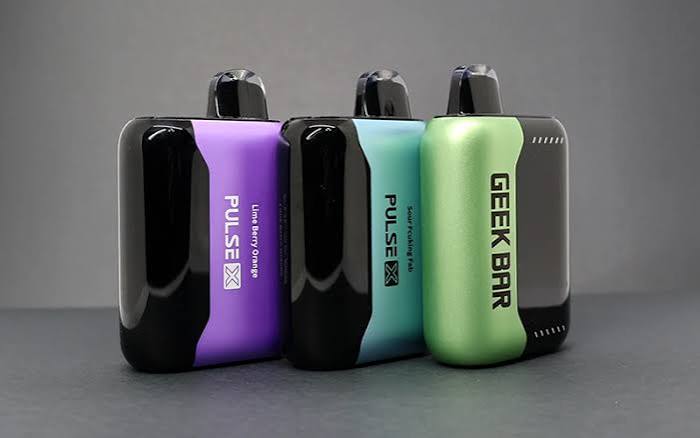
With the launch of the Geek Bar Pulse X series, hardware engineering took a massive leap forward by introducing the Starry UI display technology. Deep Dive Into Geek Bar Starry UI Display
Featuring the industry’s first 3D curved CNC panel, full-color dynamic graphics, and micro-chip visual telemetry, the Starry UI transformed screen interfaces from a simple utility into an intuitive, high-tech experience. Deep Dive Into Geek Bar Starry UI Display
In this hardware engineering analysis, we take a deep dive into Geek Bar Starry UI display technology, exploring curved screen manufacturing, VPU dual-core chip integration, visual telemetry graphics, battery efficiency, and how real-time interface design changes the way adult vapers interact with their hardware. Deep Dive Into Geek Bar Starry UI Display
1. The Technological Evolution: From Single LED to 3D Curved Telemetry
To appreciate what makes the Starry UI remarkable, it helps to trace how visual interfaces evolved across disposable generations: Deep Dive Into Geek Bar Starry UI Display
+--------------------------------------------------------------------------------------------------+
|                             DISPOSABLE VAPE DISPLAY GENERATIONS                                  |
+------------------------------+-------------------------------------------------------------------+
| Generation 1: Blinking LED   | Bottom-mounted single LED light. Blinks on dead battery or cut-off.|
| Generation 2: Monochrome LCD | Flat 0.96-inch monochrome box. Static battery % & simple fluid drop.|
| Generation 3: Flat TFT Color | Flat front-mounted color display. basic animations during draws.   |
| Generation 4: 3D Starry UI   | Ergonomic 3D curved CNC panel. Wraps chassis; dynamic telemetry.|
+------------------------------+-------------------------------------------------------------------+
Breaking Away from the Flat Screen Box
Traditional smart screens suffered from strict physical limitations. Because early LCD panels were rigid rectangular glass blocks, device bodies had to remain flat and boxy to accommodate them. Deep Dive Into Geek Bar Starry UI Display
The Starry UI broke this constraint by utilizing a curved CNC display surface. By shaping the protective cover glass and underlying display matrix along a calculated radius, the screen wraps around the side contour of the chassis. It blends seamlessly into the body lines, looking less like a disposable device and more like a curved futuristic wearable. Deep Dive Into Geek Bar Starry UI Display
2. Structural Architecture: CNC Manufacturing and Ergonomic Design
Designing a curved electronic screen for a high-volume handheld device presents severe manufacturing challenges. Disposable vapes are carried in pockets, tossed onto desk tops, and subjected to daily physical stress. Deep Dive Into Geek Bar Starry UI Display
  STARRY UI DISPLAY PANEL CROSS-SECTION

  [ Outer Layer: High-Impact CNC Curved Polycarbonate / Glass Shell ]
                              │
  [ Mid Layer: Anti-Glare Optical Coating & Contrast Enhancement Film ]
                              │
  [ Inner Layer: Flexible Low-Power micro-OLED Matrix Panel ]
                              │
  [ Circuit Layer: Micro-Flex Bus Interconnect to VPU Chipset ]
High-Impact Curved CNC Glass
The outer shield of the Starry UI display is crafted using high-precision Computer Numerical Control (CNC) milling. The surface undergoes surface polishing and an anti-scratch hard coat treatment:
Ergonomic Hand-Feel: The curved edge removes sharp plastic corners, making the chassis fit comfortably in the palm during extended use.
Impact Resistance: The subtle curve distributes impact stress across a wider arch, reducing the risk of screen cracking if accidentally dropped.
Anti-Glare Clarity: An optical anti-glare coating prevents light reflection, allowing the user to read battery and liquid metrics clearly even under direct outdoor sunlight.
- Deep Dive Into Geek Bar Starry UI Display
3. The Brain Behind the Visuals: VPU Dual-Core Processor Telemetry
A vibrant screen is useless without accurate data feeding into it. The Starry UI is powered by Geek Bar’s proprietary VPU (Vaping Processing Unit) dual-core chipset. Deep Dive Into Geek Bar Starry UI Display
                         VPU DUAL-CORE DATA ARCHITECTURE

    [ CORE A: Thermal Management ]             [ CORE B: UI & Visual Telemetry ]
   - Regulates 12W/25W wattage curves         - Renders Starry UI animations
   - Monitors dual mesh coil resistance       - Calculates real-time battery %
   - Prevents dry-hit thermal runaway          - Tracks fluid consumption algorithm
Core Separation for Instant Visual Response
In cheaper smart vapes, a single low-spec microchip attempts to manage both coil firing and screen updates simultaneously. This often causes screen lag, frozen numbers, or delayed visual feedback. Deep Dive Into Geek Bar Starry UI Display
The VPU system splits these workloads across two dedicated processor cores:
Core A (Thermal Core): Controls raw electrical current, safety cut-offs, and alternating dual-mesh coil activation.
Core B (Visual Telemetry Core): Dedicated entirely to rendering smooth 60fps graphics, managing the Starry UI constellation animations, and tracking telemetry data in real time.
- Deep Dive Into Geek Bar Starry UI Display
4. Visual Interface Anatomy: Reading the Cosmic Telemetry
The Starry UI panel presents vital hardware metrics through a clean visual hierarchy. Rather than forcing users to decipher tiny text or hidden sub-menus, everything is visible at a single glance. Deep Dive Into Geek Bar Starry UI Display
+---------------------------------------------------------------------------------+
|                         STARRY UI DISPLAY ANATOMY                               |
+------------------------------+--------------------------------------------------+
| Top Panel Section            | Numerical 2-Digit Battery Percentage (0% - 100%) |
| Center Panel Section         | Dynamic Cosmic Starry Constellation Ring         |
| Bottom Panel Section         | Multi-Segment E-Liquid Reservoir Indicator       |
| Output Mode Icon             | "REGULAR" (12W) or "PULSE" (25W Hyper-Drive Graphic)|
+------------------------------+--------------------------------------------------+
  VISUAL TELEMETRY LAYOUT

  +-----------------------+
  |    [ 98% BATTERY ]    | ➔ Clear numerical charge state
  |                       |
  |    ( *  STAR  * )     | ➔ Animated cosmic constellation ring
  |   ( * FIELD * )       |   (Pulses softly during activation)
  |                       |
  |   [|||||| JUICE]      | ➔ 5-segment e-liquid level tracking
  |    MODE: PULSE 25W    | ➔ High-wattage mode indicator
  +-----------------------+
Real-Time Metric Tracking
Numerical Battery Percentage: Displays actual remaining charge from 100% down to 0%, taking away the guesswork of static battery bars.
Multi-Segment Fluid Level: Monitored by Core B’s consumption algorithm, multi-segment fluid bars drop sequentially as liquid is vaporized from the 18mL reservoir.
Dynamic Mode Feedback: In 12W Regular Mode, the Starry UI displays a soft, pulsing constellation field. Toggle the base switch into 25W Pulse Mode, and the interface transforms into a dynamic hyper-drive visual graphic that pulses in tandem with your draw.
- Deep Dive Into Geek Bar Starry UI Display
5. Power Consumption & Energy Management
A common concern with bright visual screen panels is battery drain. Vapers often ask: Does a large 3D color display eat up power that should go toward vaporizing e-liquid? Deep Dive Into Geek Bar Starry UI Display
Geek Bar’s micro-chip engineers addressed this through aggressive energy management algorithms:
+---------------------------------------------------------------------------------+
|                       STARRY UI POWER MANAGEMENT CYCLES                         |
+------------------------------+--------------------------------------------------+
| Draw Activation State        | Screen wakes instantly at full brightness on draw|
| Standby Delay (3 Seconds)    | Maintains visual diagnostics post-draw            |
| Micro-Sleep Phase (5 Seconds)| Dims brightness to 20% to save power             |
| Deep Sleep Lock (10 Seconds) | Combing screen power down completely to 0.001mA  |
+------------------------------+--------------------------------------------------+
Low-Power micro-OLED Backlighting
The display panel uses efficient micro-OLED backlighting where black pixels draw zero electrical current. Because the Starry UI relies on a deep cosmic black background with illuminated celestial points, over 70% of the screen pixels remain turned off during activation. Deep Dive Into Geek Bar Starry UI Display
As a result, the entire display draws less than 3% of the total energy supplied by the internal 820mAh battery cell, preserving over 97% of battery reserves exclusively for thermal coil activation and vapor production. Deep Dive Into Geek Bar Starry UI Display
6. How Advanced UI Design Improves User Experience
Why does high-definition screen design matter in disposable vapor hardware? The Starry UI provides several distinct practical benefits: Deep Dive Into Geek Bar Starry UI Display
  PRACTICAL BENEFITS OF ADVANCED DIAGNOSTICS

  1. ELIMINATION OF SURPRISE DRY HITS
     Clear fluid tracking lets users know exactly when e-liquid is running empty.

  2. RECHARGE TIMING ACCURACY
     Exact numerical battery readouts allow users to time quick USB-C charges before leaving home.

  3. IMMEDIATE POWER CONFIRMATION
     Tactile mode switching is instantly verified by dramatic screen graphics.
Preventing Scorched Wicks
By providing continuous, clear visual diagnostics, users know exactly when their 18mL reservoir is nearing exhaustion. Rather than taking a surprise dry hit on a depleted tank, you can visually confirm when it’s time to replace the unit. Deep Dive Into Geek Bar Starry UI Display
Perfect Charge Management
Paired with Geek Bar’s 20-minute Type-C quick-charge circuit, the exact percentage readout allows you to manage your daily schedule. If you see the screen reading 15% before stepping out, a brief 5-minute charge boost brings the panel back up to 60% capacity—giving you complete power peace of mind. Deep Dive Into Geek Bar Starry UI Display
Final Thoughts
A deep dive into Geek Bar Starry UI display technology shows how far disposable vapor engineering has advanced. Deep Dive Into Geek Bar Starry UI Display
By combining an ergonomic 3D curved CNC screen panel with a powerful VPU dual-core processor, energy-efficient micro-OLED backlighting, and dynamic visual telemetry, Geek Bar turned standard diagnostic tracking into a seamless feature. The Starry UI set a new benchmark for how modern vapor hardware should look, feel, and perform. Deep Dive Into Geek Bar Starry UI Display