How to Charge Vape: The Complete Battery Care & Safety Guide
Understanding how to charge vape devices correctly is one of the most critical skills every vaper must master. Proper charging practices not only preserve battery longevity and ensure consistent vapor production, but they also prevent severe battery degradation, short circuits, and thermal runaway. Whether you use a compact pod system, a disposable device with a Type-C port, or a high-wattage box mod with removable 18650 batteries, learning how to charge vape hardware safely protects both your equipment and your personal safety.
In this comprehensive guide, we break down step-by-step instructions on how to charge vape units, explain the differences between internal and external battery setups, highlight essential safety precautions, and provide troubleshooting solutions for common charging issues.
1. Understanding Different Vape Battery Types
Before diving into how to charge vape hardware, it is essential to understand the specific type of battery system your device utilizes. Vape devices generally fall into two main hardware categories:
+-----------------------------------------------------------------------------------+
|                           VAPE BATTERY SYSTEM TYPES                               |
+-----------------------------------------------------------------------------------+
|  Battery Category        | Typical Device Type        | Primary Charging Method   |
+--------------------------+----------------------------+---------------------------+
|  Internal Li-Po/Li-ion   | Pod Kits, Disposables, Pen | On-board USB-C / Micro-USB|
|  External 18650 / 21700  | Box Mods, High-Wattage Mods| Dedicated External Bay    |
+--------------------------+----------------------------+---------------------------+
A. Internal Sealed Batteries
Most pod systems, vape pens, and rechargeable disposables feature an integrated lithium-ion battery sealed inside the casing. Learning how to charge vape devices in this class requires using the onboard USB port located at the base or side of the unit.
B. External Removable Batteries
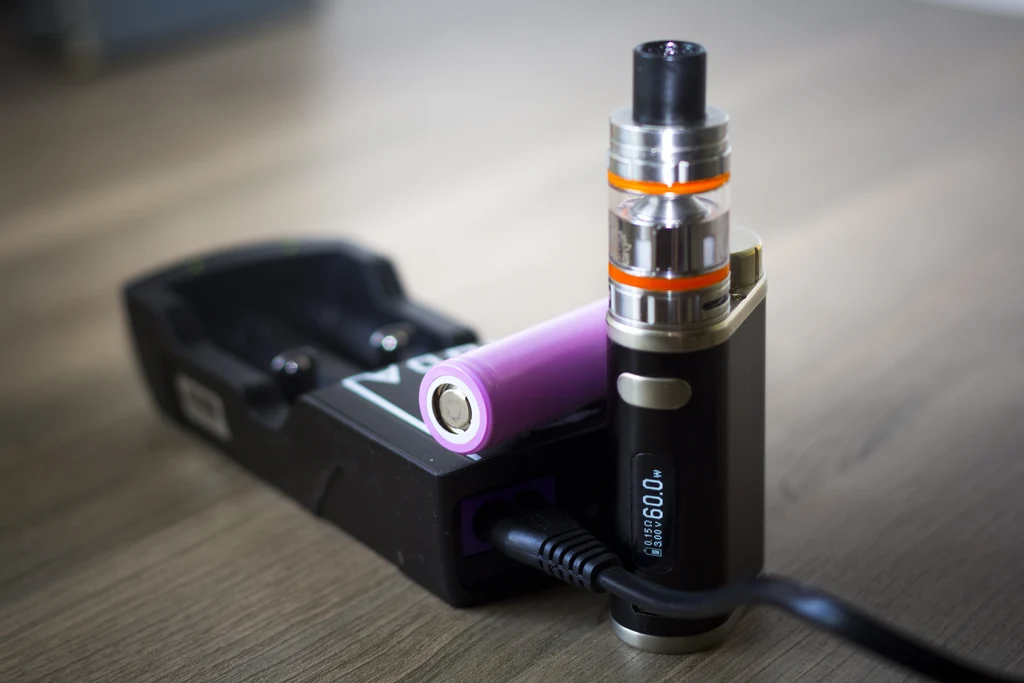
Advanced box mods utilize external cylindrical batteries—most commonly 18650, 20700, or 21700 lithium-ion cells. While many of these mods include a USB port, understanding how to charge vape setups with external cells properly means using a dedicated multi-bay external charger for maximum balance and cell health.
2. Step-by-Step Guide: How to Charge Vape Devices with Internal Batteries
If your device features a built-in battery, follow these precise steps when mastering how to charge vape pens and pod systems safely:
Step 1: Turn off device & inspect charging port
                         |
                         v
Step 2: Connect original or certified USB-C cable
                         |
                         v
Step 3: Plug into low-amp power source (5V/1A or 5V/2A)
                         |
                         v
Step 4: Monitor indicator light until fully charged
                         |
                         v
Step 5: Unplug device promptly after charge completes
Power Down the Device: Turn off your vape (typically 5 quick clicks of the fire button) before plugging it in.
Inspect the Charging Port: Check the USB-C or Micro-USB port for dust, lint, or e-liquid residue. Clean gently with a dry cotton swab or toothpick if needed.
Use the Correct Cable: Connect the device using the manufacturer-provided cable or a certified high-quality replacement cable.
Choose a Safe Power Source: When considering how to charge vape internal batteries, plug the USB cable into a standard 5V wall adapter (5V/1A or 5V/2A) or a computer USB port. Avoid high-wattage fast chargers designed for modern laptops or smartphones.
Monitor the Charge Cycle: Watch the LED indicator light or display screen. A solid green light, white light, or steady battery icon usually signifies that charging is complete. Unplug the device immediately once fully charged.
3. How to Charge Vape Hardware Using External Battery Chargers
For high-powered box mods, relying solely on onboard USB charging can strain internal chipsets over time. Here is how to charge vape removable 18650 or 21700 batteries using an external charging bay:
+-----------------------------------------------------------------------------------+
|                  EXTERNAL BATTERY CHARGING SAFETY CHECKLIST                      |
+-----------------------------------------------------------------------------------+
|  Step                 | Action Required                                           |
+-----------------------+-----------------------------------------------------------+
|  1. Inspect Wraps     | Check plastic wrap for tears, nicks, or exposed metal    |
|  2. Check Polarity    | Align Positive (+) and Negative (-) terminals correctly   |
|  3. Set Current Rate  | Select 0.5A or 1.0A charging speed per bay               |
|  4. Monitor Bays      | Remove cells once charger displays 100% or "FULL"         |
+-----------------------------------------------------------------------------------+
Inspect Battery Wraps First: Never place a battery with torn plastic wrapping or damaged insulator rings into a charger. Re-wrap damaged batteries immediately.
Observe Terminal Polarity: Align the positive (+) and negative (-) ends of the battery with the markings on the charger bays.
Select Lower Amperage: Charging at a slower rate (0.5A per bay) generates less heat and prolongs overall cell life compared to fast 2.0A charging.
Store Spares Safely: Keep spare charged batteries inside protective plastic cases—never loose in pockets where coins or keys can cause a short circuit.
4. Crucial Safety Rules: What NOT to Do When You Charge Vape Batteries
Knowing how to charge vape equipment safely means recognizing hazardous charging habits that shorten battery life or cause thermal damage.
+-----------------------------------------------------------------------------------+
|                      DO'S AND DON'TS OF VAPE CHARGING                             |
+-----------------------------------------------------------------------------------+
|  DO THIS                                | AVOID THIS                              |
+-----------------------------------------+-----------------------------------------+
|  Charge on hard, flat surfaces          | Charging on beds, couches, or pillows   |
|  Use 5V/1A or 5V/2A rated power blocks  | Using 45W+ laptop or tablet chargers    |
|  Unplug once full                       | Leaving device charging overnight       |
|  Charge in ambient room temperatures    | Charging in direct sunlight or hot cars |
+-----------------------------------------+-----------------------------------------+
Avoid Overnight Charging
Leaving your vape plugged in while sleeping is a major cause of premature battery degradation. Even if your device includes overcharge protection features, leaving it under continuous voltage creates unnecessary thermal stress.
Avoid Using Ultra-Fast Phone Chargers
Modern flagship smartphone wall blocks output anywhere from 30W to 100W+. Unless your vape user manual explicitly lists support for Power Delivery (PD) or Quick Charge (QC) protocols, these high-wattage blocks can overheat small vape batteries.
5. Troubleshooting: Why Won’t My Vape Charge?
Even when you follow every rule on how to charge vape batteries, hardware can occasionally encounter charging glitches. Use this quick troubleshooting guide to resolve issues:
+-----------------------------------------------------------------------------------+
|                   CHARGING TROUBLESHOOTING FLOWCHART                             |
+-----------------------------------------------------------------------------------+
|  Symptom              | Potential Cause              | Solution                   |
+-----------------------+------------------------------+----------------------------+
|  No LED light showing | Debris in charging port      | Clean port with toothpick  |
|  Blinking red light   | Cable or wall adapter fault  | Swap cable & power block   |
|  Device getting hot   | High ambient temp / fast charger | Unplug; cool down; use 1A block |
|  Battery drains fast  | Degraded battery capacity    | Replace device or 18650 cell |
+-----------------------------------------------------------------------------------+
6. Frequently Asked Questions (FAQ)
How long does it take when learning how to charge vape devices?
Most internal battery pod kits charging via USB-C take between 30 to 60 minutes. Advanced dual-battery box mods using external chargers typically take 2 to 4 hours.
Can I leave my device connected overnight when considering how to charge vape safely?
No. Leaving your vape on the charger overnight can lead to battery degradation, thermal stress, and unnecessary risks. Always disconnect your device once the charge cycle completes.
Can I use my phone’s fast charger when figuring out how to charge vape kits?
Avoid using high-wattage fast chargers (e.g., 45W or 65W phone blocks) unless your vape manual explicitly supports high amp input. Stick to standard 5V/1A or 5V/2A power blocks to protect internal circuitry.
What should I do if my vape light blinks while learning how to charge vape batteries?
A blinking light during charging usually indicates a poor connection, low voltage warning, or battery protection trigger. Clean the charging port with a dry swab, swap the USB cable, and retry.
7. Final Thoughts on How to Charge Vape Safely
Mastering how to charge vape hardware requires using correct power adapters, keeping charging ports clean, monitoring charge cycles, and avoiding overnight charging habits. By implementing these battery care practices, you preserve optimal flavor delivery, extend your device’s operational life, and ensure a smooth, safe vape session every time.
How to Charge Vape Devices: A Simple Checklist
For a quick reference, use this checklist:
Before charging:
- Check the device for damage.
- Make sure the charging port is dry.
- Use the correct cable.
- Use an appropriate power source.
- Place the device on a suitable surface.
During charging:
- Keep the device ventilated.
- Avoid covering it with fabric.
- Monitor for unusual heat.
- Keep it away from children and pets.
- Follow manufacturer instructions.
After charging:
- Check the battery indicator.
- Disconnect the device according to manufacturer guidance.
- Store it safely.
- Replace damaged cables when necessary.
Following this approach makes How to Charge Vape much easier to understand and reduces common charging mistakes.
Frequently Asked Questions About How to Charge Vape
1. How do I charge a rechargeable vape?
To understand How to Charge Vape devices, first identify the manufacturer’s recommended charging method. Connect the correct cable to the charging port and a compatible power source, place the device on a stable surface, and monitor its charging indicator.
2. How long does a vape take to charge?
Charging time varies by device, battery capacity, charging technology, and battery condition. Follow the manufacturer’s specified charging time or indicator rather than relying on a universal timeframe.
3. Can I charge my vape overnight?
It is better to follow the manufacturer’s instructions rather than routinely leaving a device charging unattended overnight. Disconnect it when charging is complete if the manufacturer recommends doing so.
4. Can I use my vape while it is charging?
Some devices may support pass-through operation, while others do not. Check the manufacturer’s instructions before using a device connected to power.
5. Why is my vape not charging?
Possible causes include a damaged cable, dirty or damaged charging port, unsuitable power source, battery degradation, or device failure. If the device is damaged or unusually hot, stop using it.
6. Can I charge a disposable vape?
Only charge a disposable vape if it was specifically manufactured as a rechargeable product and includes an appropriate charging system. Never modify a non-rechargeable disposable vape to make it chargeable.
7. What charger should I use?
Use the charger or cable recommended by the manufacturer. Avoid assuming that every USB charger is suitable for every vape.
8. Why does my vape get warm while charging?
Some warmth can occur during normal charging, but excessive, sudden, or unusual heat can indicate a problem. Disconnect the device and seek manufacturer guidance if it becomes unusually hot.
9. Can I charge a damaged vape?
No. A visibly damaged, swollen, leaking, burned, or otherwise abnormal battery should not be charged. Contact the manufacturer or an appropriate battery-recycling service for guidance.
10. How can I make my vape battery last longer?
Follow the manufacturer’s charging recommendations, avoid extreme temperatures, protect the device from physical damage, and replace worn or defective equipment when necessary.
Final Thoughts on How to Charge Vape Devices
Knowing How to Charge Vape devices correctly does not require complicated technical knowledge. The most important principles are to use the correct charging equipment, follow the manufacturer’s instructions, keep the device away from heat and moisture, and never charge a damaged battery.
Different vape pens, pod systems, and rechargeable devices can have different charging requirements. Therefore, the manufacturer’s instructions should always take priority over generic charging advice.
A good charging routine starts with inspecting the device, using the appropriate cable, charging it on a stable surface, monitoring the process, and storing it responsibly afterward.
If a device behaves unusually—particularly if it becomes extremely hot, swells, leaks, smells unusual, or shows signs of physical damage—stop using it and seek appropriate professional or manufacturer guidance.
Ultimately, understanding How to Charge Vape equipment is about combining correct equipment with responsible battery habits. A few simple precautions can help protect the device, extend its useful life, and reduce avoidable charging-related risks.